Metronome application for mobile phones.
Provides a convenient alternative to conventional metronomes, always available wherever you and your mobile phone are.
Assists musicians in keeping a regular tempo while playing or rehearsing. Provides metronome beats at various tempo settings from 20 up to 840 beats per minute, Beat Patterns and an alternative Visual beat display. A beginning of bar (bell) sound can be set for the appropriate number of beats in a bar.
The Detect Tempo function will determine the current tempo from multiple key presses and then synchronize its own metronome beat to the detected tempo.
Volume, beats per bar and tempo settings are adjustable via the navigation keys or quick shortcut keys as well as from the main settings menu, and touch screen if available.
Includes Concert A tone for tuning, Favourites menu and Complex Beat Patterns
| Metronome Features | |
|
Metronome v2
|
For a trial version:
|
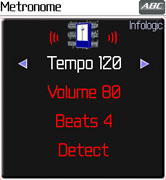
Available for most Java enabled mobile phones.
Metronome Screenshots
Mobile phone application providing metronome beats at standard musical tempo settings with optional beginning of bar sound and auto detect tempo function.
| Menu
|
Setup
|
| Favourites
|
Edit
|
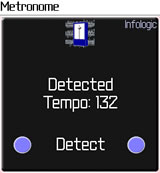
| Detected Tempo
|
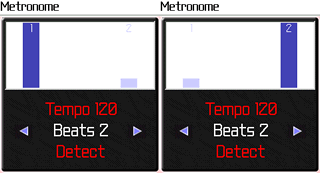
Beats Per Bar: 2
|
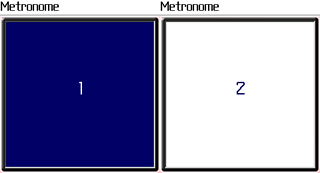
| Flashing Beat
|
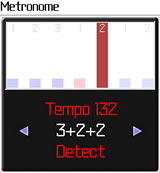
Beat Pattern: 3+2+2
|
| Beat Pattern: 2,3
|
Beat Pattern: 2,3,5
|
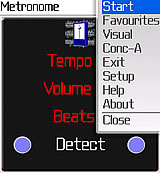

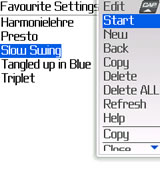
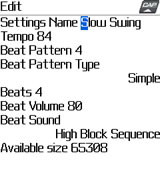
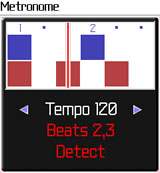
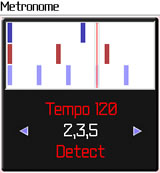
Note, the position of commands and screen appearance may vary from the examples shown.
"... it's possible to enter a complex Buleria compas (Flamenco)
as they call it in Spain. Great stuff ... After a long search finally someone
comes up with a decent metronome that can handle complex patterns and is
easy in use and portable!!", GJ 20th June 2009
"As a music tutor, this was one of the most useful and frequently used applications on my BlackBerry Curve", MM 8th July 2009
Features
Tempo: Musical tempo in beats per minute. Range is 20 bpm through to 240 or upto 840 bpm on many mobiles.
Volume: The beat and concert-A volumes can be changed independently. Volume may also dependent on the phone's normal volume settings.
Audio Boost: This feature provides louder beat sounds on some mobile phones.
Beats Per Bar or Complex Beat Patterns: This can be optionally set to provide a different sound (bell) at the beginning of each bar. The possible values are 0 (no bell) through to 20 beats per bar. Usual values are 2, 3 or 4.
If a more complex rhythm is required, a bar can be specified as containing two or more groups of notes. For example an Additive Beat Pattern of 3+2+2 would specifiy a 7 beat bar broken into three beats, two beats and two beats. It is also possible to play triplets, quintuplets etc. against the main beat. For example a Tuplet Beat Pattern of 2,3 specifies a 2 beat bar played together with a triplet. 2,3,5 adds a quintuplet.
Tuplet Beat Patterns with one number against another (2,3 or 3,4 etc) can be used to learn the correct timing. When using the Visual Beat Display the cursor moves when one or other of the beats is due. This is easiest to see at lower tempo values.
Beat Sound: One or more different beats sounds can be selected. Once a sound has been selected, the application will remember it and use it again the next time the application is started.
Bell Sound: Set BELL sound used at the beginning of each bar (see Beats Per Bar). This setting may be ignored by some of the Beat Sounds which have their own dedicated Bell.
Concert A: Provides a 440Hz Concert A tone for tuning, with independant volume setting. Several alternative tones are provided.
Favourite Settings: Create and save your own settings to be used for different pieces of music. You can create, edit, copy, paste, delete and start.
This can be used to learn to play at the same tempo as an audio track. Tap 'Detect' in time with your track, choose Favourites > New and give it a name to save it. Then all you need to do is practice and try and keep up!
| Setting | Description |
| Settings Name | Choose a name to help you to remember these settings. eg. "Slow Swing", "Coltrane", "Bach Sarabande" |
| Tempo | Set the tempo in beats per minute |
| Beat Pattern | The number of Beats per Bar, or Beat Pattern |
| Beat Pattern Type | Choose between Simple, Additive or Tuplet |
| Beat Volume | Specific volume setting. |
| Beat Sound | Set to one of the available sounds or Visual |
Automatic Regulation: Some beat/bell sounds may not sound correctly, especially at high tempo settings. The application will attempt to detect irregular beats and adjust itself to enable a correct beat to be provided. If it is not possible to achieve a regular beat, the user is presented with the option of selecting one of the other sounds. Each type of sound is regulated individually, which allows for the optimum setting for each sound.
Auto Save: The above settings are saved on application exit and remembered for use next time the application is started. Auto Save also occurs if an incoming phone call is received.
Quick Change: The main settings can be quickly changed from the main screen. Use the navigation keys UP and DOWN to select between Tempo, Volume and Beat Pattern. Then use LEFT to decrease and RIGHT to increase.
Hold the keys down and Metronome will quickly repeat the change.
Special action for Tempo. The Tempo range is large so Metronome will initially change one step at a time, but after the key is pressed several times (or pressed and held) it will start to change in larger steps.
If Touch Screen is supported on your Mobile Phones you can quickly change the tempo, volume, beats per bar; start and stop; and detect tempo. Press and hold the relevant symbol for quicker changes.
| Normal Key(s) | Action | ||||||||
| 1 and 3 | Decrease/Increase Tempo | ||||||||
| 2 or UP and DOWN | Change between Tempo, Volume, Beats and Detect | ||||||||
| 4 or LEFT and 6 or RIGHT |
Decrease and Increase current setting (Tempo, Volume, Beats) | ||||||||
| 5 or SELECT or FIRE |
This depends on which setting is highlighted as follows
|
||||||||
| 7 and 9 |
Select Beat Pattern or Beats per Bar. The 7 and 9 keys can be used to select (from left to right) Beat Patterns, 0 beats per bar, 1-20 beats per bar. |
||||||||
| 8 | Change selected Beat Pattern | ||||||||
| *,0,# or [space] | Detect Tempo (several key presses required) |
Change Beat Patterns: Upto 10 beat patterns are saved for quick access from the main screen. Select one of the Beat Patterns (Keep pressing '7' and then press '8' or FIRE to change. You can type the beat pattern as a string of numbers or choose the type and Beats seperately. You can save more by creating a Favourite setting.
Detect Tempo: The application will automatically detect tempo when the 0 key is pressed several times. Listen to some music, press the 0 key in time to the music, and the detected tempo will be displayed. When you stop pressing the 0 key, the metronome tempo will automatically synchronize to the detected beat. For convenience, it may be possible to use the *, # or [space] keys instead, or press 'Detect' on touch screens.
Keypad Menu
: This offers an alternative way of setting Tempo, Volume and Beats Per Bar via shortcut keys. It needs to be enabled in Setup > Settings Control. and can then be accessed from the main menu or by pressing any of the keys 1 - 9. While the Keypad Menu is displayed, the above values can be increased or decreased. The menu automatically hides itself after a few seconds allowing the main screen to show again.| Shortcut Key(s) | Action |
| 1 | Decrease Tempo (see 2) |
| 2 | Change Tempo adjustment value used by keys 1 and 3. Can be set to fine, medium, course |
| 3 | Increase Tempo (see 2) |
| 4 | Decrease Volume |
| 5 | Start / Stop Metronome |
| 6 | Increase Volume |
| 7,9 |
Select Beat Pattern or Beats per Bar. The 7 and 9 keys can be used
to select (from left to right) |
| 8 | Change Beat Pattern |
| *,0,# or [space] | Detect Tempo (several key presses required) |
eg. Press key 5 to start/stop the metronome, key 3 to increase the tempo, or key 1 to decrease the tempo.